
Real Isolation for Coding Agents, on Your Hardware
No command approvals. Every task starts clean.
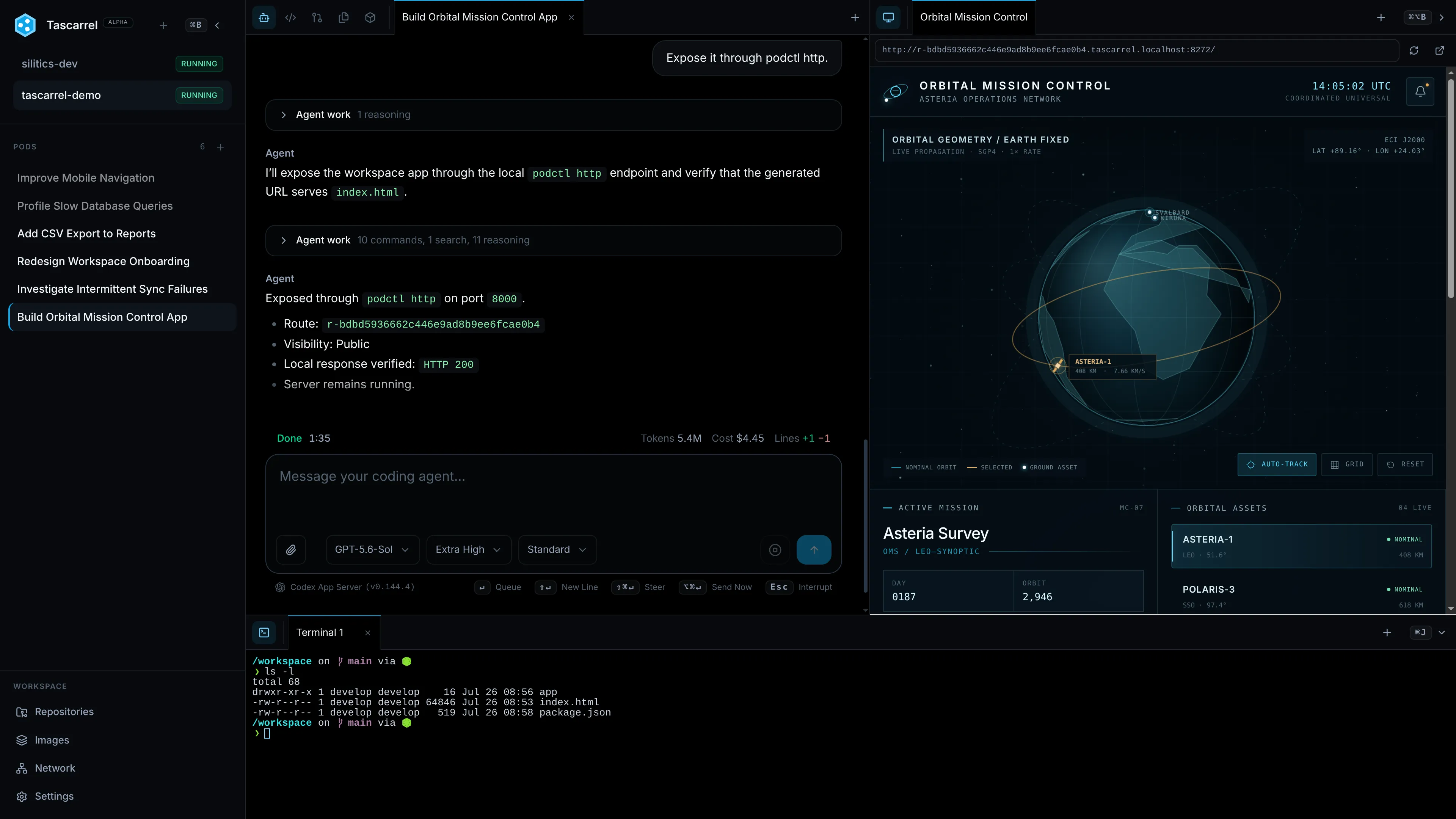
Each workspace gets its own VM, and each task a disposable pod within it. Inside that pod, an agent can install, build, and run anything. Git operations and HTTP APIs are mediated through the host. The required secrets never enter the VM.
Apple Silicon macOS · x86-64 and AArch64 Linux · Apache-2.0 or MIT
Autonomy through Isolation
Delegate More Work with Confidence
An agent on your machine runs with all your access, so you approve its commands one by one. In a workspace VM it gets only what you granted that workspace, so you can leave it alone.
The workspace VM is the safety boundary. Pods provide lightweight separation within it.
Run Tasks in Parallel
Every task gets its own pod: a fresh copy of the workspace with private files, processes, and network. Run as many at once as your hardware allows, without them stepping on each other.
Declare the Boundary Once
Say what a workspace may reach. After that, agents build, test, and install inside it without asking you to approve each command.
Contain Untrusted Code
Each workspace VM runs its own kernel behind a hardware-virtualized boundary, separate from your machine and every other workspace. It is built to hold against code that actively tries to escape.
Multi-Repository Workspaces
One Task Can Cross the Whole Product
Give an agent every related repository in one workspace. It can trace contracts across codebases, make coordinated changes, and run the complete system without losing the thread between them.
Each repository keeps its own history and publication policy, so you can review and publish them one at a time.
Coordinated Changes · 3 Repositories
- /workspace/product/webAccount settings and audit timeline3 files changed
- /workspace/services/apiAudit event contract and persistence5 files changed
- /workspace/platform/deployService permissions and rollout config2 files changed
Host-Mediated Git
Let Agents Commit. Keep Publish Authority.
The Tascarrel host is the only component that contacts upstream Git. Agents work with familiar Git commands, while fetches and pushes cross a mediated boundary.
01Agent Pod
Prepare the Change
Edit, test, commit, fetch, and push inside the pod with normal Git tooling.
02Tascarrel Host
Evaluate the Proposal
Turn the push into exact ref updates and apply branch, tag, and approval policy.
03Git Upstream
Publish What Is Allowed
Use host-owned credentials and object leases to publish the approved updates.
Credential BoundaryUpstream Git credentials never enter the workspace VM.
Review and Publish ChangesOversight When It Matters
Stay on Top without Staying Glued to It
Agents keep working whether or not you are watching. The workbench is what you come back to: what finished, what needs a decision, and what the code now looks like.
Queue Work and Walk Away
Send a follow-up prompt while an agent is mid-turn and it arrives when the turn ends. Switch between pods without interrupting any of them.
See What Needs You
The workbench shows you whatever needs a decision, from a finished task to a push held for approval. You never have to go looking.
Take Over When You Need To
Open a terminal, an editor, or the running application inside the pod. Reproduce a failure, fix something by hand, then hand the task back to the agent.
Read the Diff
Browse the files, diffs, and commits a task produced, then decide whether the work is ready.
Your Existing Development Setup
Add the Workbench, Not Another Stack
Keep the agents, subscriptions, repositories, and development tools you already use. Tascarrel gives them a reusable context and one place to work together.
Bring Your Agent Subscriptions
Use Codex or Claude Code with the subscription you already pay for, or Tascarrel's agent with any OpenAI-compatible endpoint. Point it at a local model and no prompt leaves your hardware.
Keep the Setup in Version Control
Repositories, tools, caches, and access rules live in a Dockerfile and a config.toml your team can review like any other file. Every fresh pod starts from them.
Run Real Development Workloads
Use containers, Nix, nested virtualization, shared caches, or forward a USB device from a Linux host when the project requires it.
Use Host-Injected Credentials
Git authentication happens on the host. For HTTP APIs, the workload sends a placeholder and the host swaps in the real secret once the request has left the VM, only for explicitly admitted HTTP methods.
Install Tascarrel on Your Machine
Create your first isolated workspace and give an agent a task in minutes.
curl --proto '=https' --tlsv1.2 -fsSL \
  https://tascarrel.dev/install.sh | sh
The installer checks host virtualization, installs missing QEMU, Git, and SOPS packages, verifies the release checksum, and starts a per-user service. Missing Linux packages are installed with sudo; macOS package installation requires Homebrew. Rather read it first? Fetchinstall.sh, check it, then run it.